How to Create Professional Images with AI Tools

Have you ever seen an amazing image online and thought, “There’s no way someone made that in just a few minutes.” Well…these days, they probably did.
AI image generators have changed the way people create pictures. What used to take hours in Photoshop can now take only a few minutes with the right AI tool and a good prompt.
The best part ? You don’t need to be a professional designer anymore.
Whether you’re creating social media graphics, blog images, YouTube thumbnails, business advertisements, digital art, or product photos, AI can help you produce stunning visuals without spending years learning graphic design.
But here’s the catch.
Simply typing “make me a cool image” into an AI generator usually won’t give you impressive results.
Professional – looking AI images come from understanding how these tools work and learning a few simple techniques.
In this guide, you’ll discover exactly how to create professional images with AI tools, write better prompts, avoid common beginner mistakes, and make your images look polished enough for websites, marketing, and even client work.
Let’s jump in.
Table of Contents
Why AI Image Creation Is Growing So Fast
AI image generation isn’t just another tech trend. It’s becoming part of everyday work.
Businesses use AI for advertisements.
Bloggers create featured images.
Teachers make classroom visuals.
YouTubers design thumbnails.
Small businesses create social media posts.
Even people who have never opened Photoshop are producing graphics that look surprisingly professional.
According to industry reports from organizations like Adobe and McKinsey, AI – assisted creative work is helping businesses save both time and money while increasing productivity.
That doesn’t mean AI replaces creativity.
Instead, it gives creative people a much faster starting point.
Think of AI as your creative assistant – not your replacement.
Read also :- AI Trends 2026: What Is Changing Right Now ?
What Makes an AI Image Look Professional ?
This is where many beginners get stuck.
They assume expensive AI tools automatically create beautiful artwork.
That’s not true.
A professional image usually has several important qualities.
Clear Subject
The main object should be easy to recognize.
Whether it’s a person, product, animal, or landscape, viewers should immediately know what they’re looking at.
For example:
Instead of:
“A dog”
Try:
“A happy golden retriever sitting in a sunny park during autumn, realistic photography, shallow depth of field.”
See the difference ?
More details help AI understand exactly what you want.
Read also :- AI Trends 2026: What Is Changing Right Now ?
Good Lighting
Lighting changes everything.
Professional photographers spend years learning lighting because it dramatically affects image quality.
The same idea applies to AI.
Useful lighting styles include:
- Natural sunlight
- Golden hour
- Studio lighting
- Soft lighting
- Cinematic lighting
- Neon lighting
- Dramatic shadows
- Warm indoor lighting
Simply adding one lighting style to your prompt can completely transform the final image.
High Detail
Professional images usually include textures and realistic details.
Instead of saying:
Modern office
Try:
Modern glass office with wooden desks, indoor plants, soft sunlight through large windows, ultra-realistic details.
Small details often make the biggest difference.
Balanced Composition
Composition simply means how objects are arranged.
Professional images avoid clutter.
The subject should stand out without too many distractions.
Think about movie posters.
Your eyes immediately know where to look.
That’s good composition.
Consistent Style
Mixing too many styles often creates strange results.
Instead of asking for:
- cartoon
- watercolor
- realistic
- anime
- oil painting
…all in one prompt, choose one clear direction.
Consistency makes images feel polished.
Read also :- AI Trends 2026: What Is Changing Right Now ?
Best AI Tools for Creating Professional Images
There are dozens of AI image generators available today.
Some focus on realism.
Others specialize in illustrations, artwork, or marketing graphics.
Here are some of the most popular choices.
1. ChatGPT Image Generation
If you’re already using ChatGPT, creating images has become much easier than ever.
Instead of learning complicated prompt structures, you can simply describe what you want in everyday language.
For example:
Create a realistic coffee shop interior with warm lighting and customers working on laptops.
If the image isn’t perfect, you can simply ask:
- Make it brighter.
- Add more plants.
- Remove the people.
- Change the colors.
- Make it look more cinematic.
That conversational editing process feels much more natural than starting over each time.
It’s especially useful for:
- Blog images
- Social media graphics
- Marketing visuals
- Concept art
- Website illustrations
2. Midjourney
Midjourney has earned a strong reputation for producing artistic, highly detailed images.
Many designers use it for:
- Fantasy artwork
- Architecture
- Fashion concepts
- Character design
- Luxury product photography
Its images often have a unique artistic style that stands out.
The learning curve is a bit steeper, but many creators feel it’s worth the effort.
3. Adobe Firefly
If you already use Photoshop or Illustrator, Adobe Firefly fits naturally into your workflow.
One big advantage is that Adobe focuses on commercially safer image generation, making it attractive for businesses and marketers.
It’s excellent for:
- Advertising
- Graphic design
- Product mockups
- Commercial content
Read also :- AI Trends 2026: What Is Changing Right Now ?
4. Canva AI
Canva has become a favorite for beginners because everything happens in one place.
Instead of generating an image and downloading it elsewhere, you can immediately add:
- Text
- Logos
- Icons
- Shapes
- Brand colors
- Templates
This makes Canva especially useful for social media posts and presentations.
5. Stable Diffusion
Stable Diffusion gives users much more control than many other AI generators.
Advanced users like it because they can customize almost every part of the image generation process.
It’s ideal for:
- Developers
- Designers
- Custom AI workflows
- Open – source projects
- Advanced editing
If you enjoy experimenting, Stable Diffusion offers plenty of flexibility.
Read also :- AI Trends 2026: What Is Changing Right Now ?
How to Write AI Prompts That Produce Better Images
Here’s a little secret.
The AI tool isn’t usually the reason your image looks bad.
The prompt is.
A vague prompt creates vague results.
A detailed prompt gives the AI a much clearer idea of what you want.
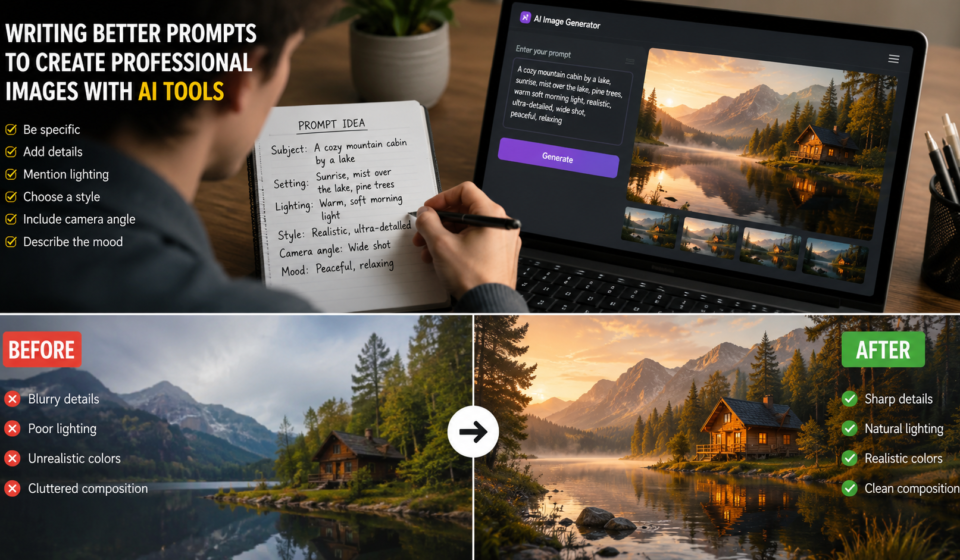
A simple structure you can follow is:
Subject + Environment + Lighting + Style + Camera Angle + Quality
For example:
A confident female entrepreneur working on a laptop inside a modern office, warm natural sunlight through large windows, realistic photography, shallow depth of field, professional DSLR camera, ultra-high detail, clean composition.
Notice how every detail adds clarity.
Advanced Prompt Techniques That Make AI Images Look Professional
Once you’ve learned the basics, it’s time to level up.
The biggest difference between a beginner and someone who consistently creates amazing AI images isn’t the tool they use – it’s how they write prompts.
Think of your prompt as a creative blueprint. The more specific and organized it is, the better your results will be.
Start With the Main Subject
Always tell the AI exactly what the image is about.
Instead of:
A person
Try:
A young entrepreneur working at a modern standing desk with dual monitors.
The AI now has a much clearer direction.
Add the Setting
Where is your subject ?
The location matters more than you might think.
Examples include:
- Cozy coffee shop
- Modern office
- Beach at sunset
- Luxury apartment
- Mountain cabin
- Busy New York street
- Bright photography studio
A detailed setting adds realism and context.
Describe the Mood
Professional images often make people feel something.
Try adding words like:
- Calm
- Inspirational
- Luxury
- Minimalist
- Cozy
- Futuristic
- Professional
- Cheerful
- Elegant
- Dramatic
For example:
A luxury skincare product on a marble countertop with soft morning light and an elegant minimalist aesthetic.
That sounds much more polished than simply asking for a “product photo.”
Read also :- AI Trends 2026: What Is Changing Right Now ?
Mention Camera Angles
This simple trick can dramatically improve your results.
Useful camera angles include:
- Close – up
- Wide angle
- Top – down view
- Eye – level shot
- Macro photography
- Portrait orientation
- Aerial view
- Side profile
Example:
Close-up portrait of a smiling teacher in a bright classroom.
Specify Image Quality
Many AI tools understand photography terms.
Examples:
- Ultra realistic
- High resolution
- 8K
- DSLR quality
- Sharp focus
- Cinematic
- Editorial photography
- Professional lighting
Use these naturally instead of repeating them over and over.
Professional Prompt Examples
Let’s compare.
Weak Prompt
A laptop on a desk.
Result ?
Probably something average.
Better Prompt
Modern silver laptop on a clean wooden desk inside a bright office with indoor plants, natural sunlight, shallow depth of field, realistic photography.
Already much better.
Professional Prompt
A sleek silver laptop on a minimalist walnut desk inside a modern creative office with indoor plants, large floor-to-ceiling windows, warm morning sunlight, realistic DSLR photography, shallow depth of field, clean composition, premium workspace, ultra-high detail.
See the difference ?
Small improvements create much better images.
Read also :- AI Trends 2026: What Is Changing Right Now ?
Best Types of Images You Can Create with AI
One of the best things about AI image generators is their versatility.
You aren’t limited to digital art.
Here are some of the most useful image categories.
Blog Featured Images
Blog images grab attention before anyone reads your article.
For example:
- Technology blogs
- Travel blogs
- Health articles
- Business websites
- Personal finance blogs
A unique featured image can also help strengthen your brand.
Social Media Graphics
Instead of spending hours designing posts, AI can generate fresh visuals for:
- X ( formerly Twitter )
Just remember to keep your branding consistent.
YouTube Thumbnails
Great thumbnails increase clicks.
AI can help create:
- Facial expressions
- Backgrounds
- Product images
- Dramatic lighting
- Attention – grabbing concepts
You can then finish the thumbnail in Canva or Photoshop.
Marketing Graphics
Businesses now create:
- Sale banners
- Email graphics
- Website headers
- Landing page images
- Promotional posters
Much faster than traditional design workflows.
Product Photography
Selling online ?
AI can generate lifestyle scenes without renting expensive studios.
Examples include:
- Beauty products
- Watches
- Clothing
- Coffee mugs
- Electronics
- Furniture
Many small businesses now combine AI-generated backgrounds with real product photos.
Digital Art
Artists use AI to explore ideas before creating final illustrations.
It’s useful for:
- Book covers
- Fantasy artwork
- Character concepts
- Game assets
- Comic inspiration
AI speeds up brainstorming without replacing creativity.
Read also :- AI Trends 2026: What Is Changing Right Now ?
Common Mistakes Beginners Make
Everyone makes mistakes when starting out.
The good news ?
Most are easy to fix.
Mistake #1: Using Extremely Short Prompts
Short prompts rarely produce professional results.
Bad:
Office
Better:
Modern office with glass walls, natural lighting, indoor plants, realistic photography.
Mistake #2: Adding Too Many Styles
This is surprisingly common.
For example:
Anime, watercolor, oil painting, realistic, cartoon, cyberpunk, sketch.
The AI becomes confused.
Choose one main style.
Mistake #3: Ignoring Lighting
Lighting often determines whether an image feels amateur or professional.
Always include lighting whenever possible.
Mistake #4: Expecting Perfect Results Immediately
Even experienced designers rarely get the perfect image on the first try.
They generate several versions.
Then they refine.
Then they edit.
That’s completely normal.
Mistake #5: Forgetting to Edit
AI images usually improve after small adjustments.
Simple edits include:
- Cropping
- Brightness
- Contrast
- Sharpening
- Background cleanup
- Color correction
Those tiny improvements make a surprisingly big difference.
Read also :- AI Trends 2026: What Is Changing Right Now ?
How to Make AI Images Look Even Better
Generating the image is only half the process.
Professional creators spend time polishing the final result.
Here are some easy upgrades.
Remove Small Imperfections
Look carefully for:
- Extra fingers
- Strange text
- Odd reflections
- Distorted faces
- Unrealistic objects
Most AI tools now let you edit these areas quickly.
Improve Colors
Good color balance creates a more premium look.
Warm colors often feel inviting.
Cool colors create a modern, clean appearance.
Choose colors that match your brand.
Increase Resolution
If your image looks blurry, use an AI upscaler.
A higher – resolution image looks sharper on websites, blogs, and printed materials.
Add Branding
Businesses often add:
- Logo
- Website URL
- Brand colors
- Custom fonts
This helps build recognition across all marketing channels.
Use Consistent Design
If you’re creating multiple images for one project, keep the same:
- Color palette
- Style
- Lighting
- Background
- Font choices
Consistency makes your content look more professional.
Read also :- AI Trends 2026: What Is Changing Right Now ?
Are AI – Generated Images Good for SEO?
Yes – but only if you use them correctly.
Google doesn’t rank images simply because they were made with AI.
Instead, it rewards images that improve the user experience.
Here are a few SEO best practices:
- Use descriptive file names.
- Write keyword – rich alt text.
- Compress images for faster loading.
- Choose modern formats like WebP when possible.
- Match every image to the surrounding content.
- Avoid stuffing keywords into alt text.
For example:
Bad filename
IMG12345.jpg
Good filename
create-professional-images-with-ai-tools.webp
Optimize Alt Text Naturally
Instead of writing:
AI image
Write something more descriptive:
Professional AI-generated office workspace created with an AI image tool.
That gives search engines meaningful context while remaining helpful for accessibility.
Read also :- AI Trends 2026: What Is Changing Right Now ?
Real – Life Examples of AI Image Creation
Imagine you run a small bakery.
Hiring a photographer every week to capture new cupcake photos could get expensive.
Instead, you could use AI to generate attractive promotional backgrounds and seasonal concepts, then combine them with photos of your actual products. The result is eye – catching marketing content that saves both time and money.
Or picture a travel blogger planning an article about national parks. Before even booking a trip, they can use AI to create custom header graphics, maps, and concept art that match the theme of the post. Once real photos are available, those AI visuals can still be useful for infographics or social media.
Even teachers are finding creative uses. A history teacher might generate illustrations of ancient cities or historical scenes to make lessons more engaging. Students often remember visual content better than plain text, so these images can help bring complex topics to life.
These examples show that AI isn’t just for designers. It’s becoming a practical tool for entrepreneurs, educators, marketers, bloggers, and anyone who needs high – quality visuals quickly.
Trusted Resources to Learn More
If you’d like to sharpen your AI image creation skills, these trusted resources are worth exploring:
- OpenAI Image Guide: https://openai.com
- Adobe Firefly Learning Hub: https://www.adobe.com
- Google Search Central Image SEO: https://developers.google.com/search/docs/appearance/google-images
These sources offer up – to – date guidance on image generation, editing, and SEO best practices.
Read also :- AI Trends 2026: What Is Changing Right Now ?
Final Words
Creating professional images with AI tools is no longer limited to experienced designers or large creative agencies. With the right prompts, thoughtful editing, and a little practice, you can produce visuals that look polished and support everything from blog posts to marketing campaigns.
The key is to treat AI as a creative partner rather than a magic button. Start with a clear idea, describe it in detail, experiment with different versions, and don’t be afraid to make small edits afterward. Those extra few minutes often turn a good image into a great one.